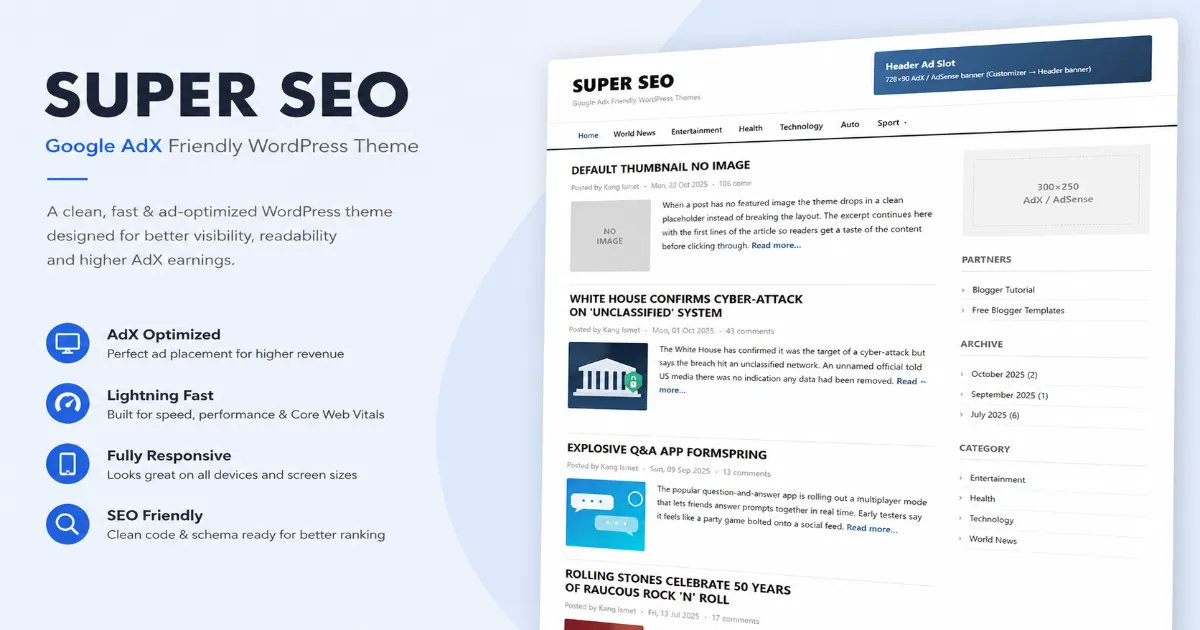
If you run an AdSense or Google Ad Manager blog, your theme is doing more than looking pretty it decides how fast your pages load, how cleanly your ad units sit inside the content, and how much of your traffic search engines can actually read. The Google AdX Friendly WordPress theme is a free, lightweight magazine theme built around exactly those priorities: speed, clean ad placements, solid on-page SEO, and a tidy reading experience on every screen size.
In this post you’ll see what the theme includes, how it looks, how to install it in a couple of minutes, and how to set up the logo, menus, ad slots and author box after activation.
What is the Google AdX Friendly theme?
It’s a classic news/magazine-style WordPress theme with a two-column layout: a main content stream on the left and a sticky-friendly sidebar on the right. The design keeps a clean white base so your content and your ads stand out instead of fighting a busy background. Under the hood it ships with dedicated ad slots, automatic related posts, an author box, structured-data SEO output and a set of sensible security tweaks, so you don’t have to bolt on five extra plugins just to get a publish-ready site.
It’s a good fit for tech blogs, news sites, how-to and tutorial sites, and any content publisher whose income depends on ads loading quickly without wrecking the layout.
Key features
1. Built for ads (AdSense & Ad Manager / AdX)
The theme includes ready-made ad areas a header banner slot and an in-content unit inside single posts that you control from the Customizer. Just paste your AdSense or Ad Manager code once and it appears in the right place across your site. Because the slots live in the template rather than being pushed in by a plugin, they render predictably and don’t shift your layout around as they load.
2. Custom logo with title & tagline toggles
Upload your own logo through the WordPress Customizer, and independently switch the text site title and tagline on or off. Want just the logo? Turn the text off. Want a clean text wordmark and no image? That works too.
3. Two menu locations
The theme registers a Header menu and a Footer menu, both managed from Appearance → Menus. Put your main navigation up top and your utility links (About, Contact, Privacy Policy, Disclaimer) in the footer.
4. Fully responsive
The layout adapts down to phones with a proper hamburger menu, stacked post cards and touch-friendly spacing. Nothing overflows, and nothing needs pinch-zoom to read.
5. Automatic related posts
Below every single post the theme shows two related articles as attractive cards complete with thumbnail, category badge and a subtle hover effect. Related posts are chosen by shared category or tag, and if there aren’t enough matches it gracefully falls back to your recent posts, so the section is never empty.
6. Author box with a custom photo
After the related posts, each article ends with an author box showing the writer’s photo, name, role and bio. The author image is pulled from the WordPress profile, and the theme adds a simple Profile Picture field to the user profile screen so you can set it without touching Gravatar if you’d rather not.
7. SEO-ready out of the box
The theme outputs clean structured data (JSON-LD for your site, articles and breadcrumbs), a meta description and Open Graph / Twitter Card tags so your links look right when shared. If you already run Yoast, Rank Math, All in One SEO or SEO Framework, the theme detects it and automatically steps back so you never get duplicate tags.
8. Speed-focused
Small stylesheet, a single deferred script for the menu, lazy-loaded images and priority hints on key images the theme is deliberately light so it gives your Core Web Vitals a good starting point.
9. Security-hardened defaults
Version strings are hidden, XML-RPC pingbacks are disabled, author-enumeration scans are blocked, and standard security headers are added sensible defaults that many themes leave for you to figure out later.
Live demo
Before you download, open the live preview to see both the homepage and a single-post view, including the ad slots, related-post cards and author box. Resize the window to watch it switch to the mobile layout.
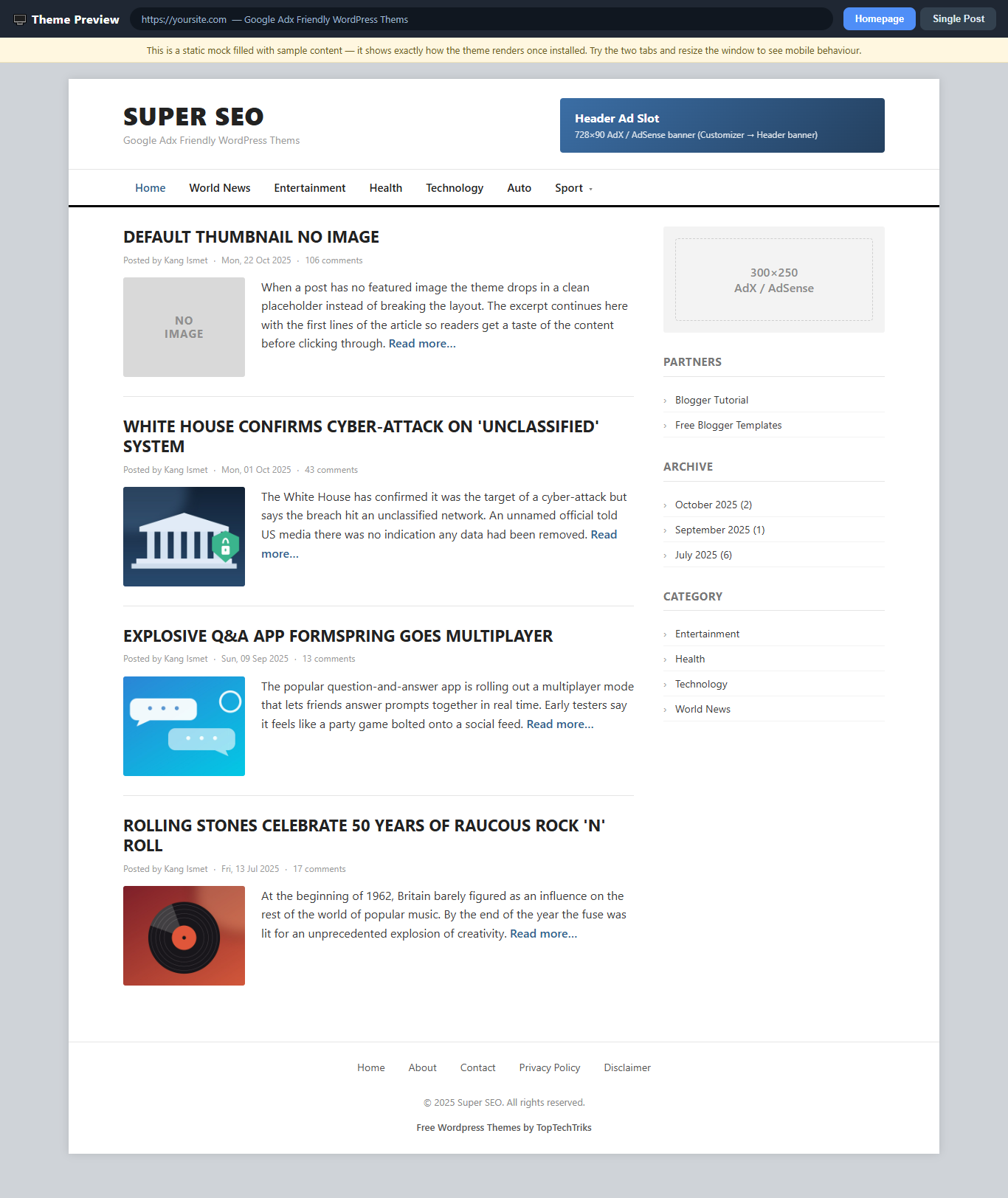
Tip: The images in the demo are sample placeholders. On your real site, each post’s image comes from its Featured Image, which the theme automatically crops to the right size for the post list and the related-post cards.
How to install (2 minutes)
- Download the theme
.zipfile from the link below (keep it zipped). - In your WordPress dashboard, go to Appearance → Themes → Add New.
- Click Upload Theme, choose the
.zipfile, and click Install Now. - When it finishes, click Activate.
That’s it your site is now running the theme. Next, spend five minutes on the setup below.
Setting it up after activation
Logo, title & tagline
Go to Appearance → Customize → Header & Branding. Upload your logo, and use the checkboxes to show or hide the site title and tagline.
Menus
Go to Appearance → Menus. Create your menu, then assign it to the Header or Footer location. You can build two separate menus for the two spots.
Ad slots
Open Appearance → Customize and find the ad settings. Paste your header banner code and your in-post ad code into the boxes, then publish. Leave a box empty to hide that slot.
Author photo
Go to Users → Profile, scroll to Profile Picture, add your image URL (or use the media button), add a short bio, and save. It’ll show in the author box under your posts.
Frequently asked questions
Is the theme really free?
Yes. It’s free to download and use, including on sites that run ads. The footer keeps a small “Free WordPress Themes by TopTechTriks” credit link.
Will it work with AdSense and Google Ad Manager?
Yes. You paste your ad code into the theme’s ad slots, so it works with AdSense, Ad Manager / AdX, and most ad networks that give you a code snippet.
Do I need an SEO plugin?
Not to get started the theme outputs structured data and social tags on its own. If you install a dedicated SEO plugin later, the theme detects it and steps aside to avoid duplicate tags.
Will it pass Google’s PageSpeed test?
The theme itself is built light and fast, which gives you a strong foundation. Your final score still depends on your hosting, image sizes and importantly the ad scripts you load, since ad code affects loading speed on any theme. Optimize images and use good hosting for the best results.
Is it secure?
The theme ships with security best practices baked in (hidden version info, disabled pingbacks, security headers and blocked author scans). Real-world security also depends on keeping WordPress, plugins and passwords up to date, so treat these defaults as a solid head start rather than a substitute for good site hygiene.
Download
Grab the theme, install it, and you’ll have a fast, ad-ready, SEO-friendly site in a few minutes.